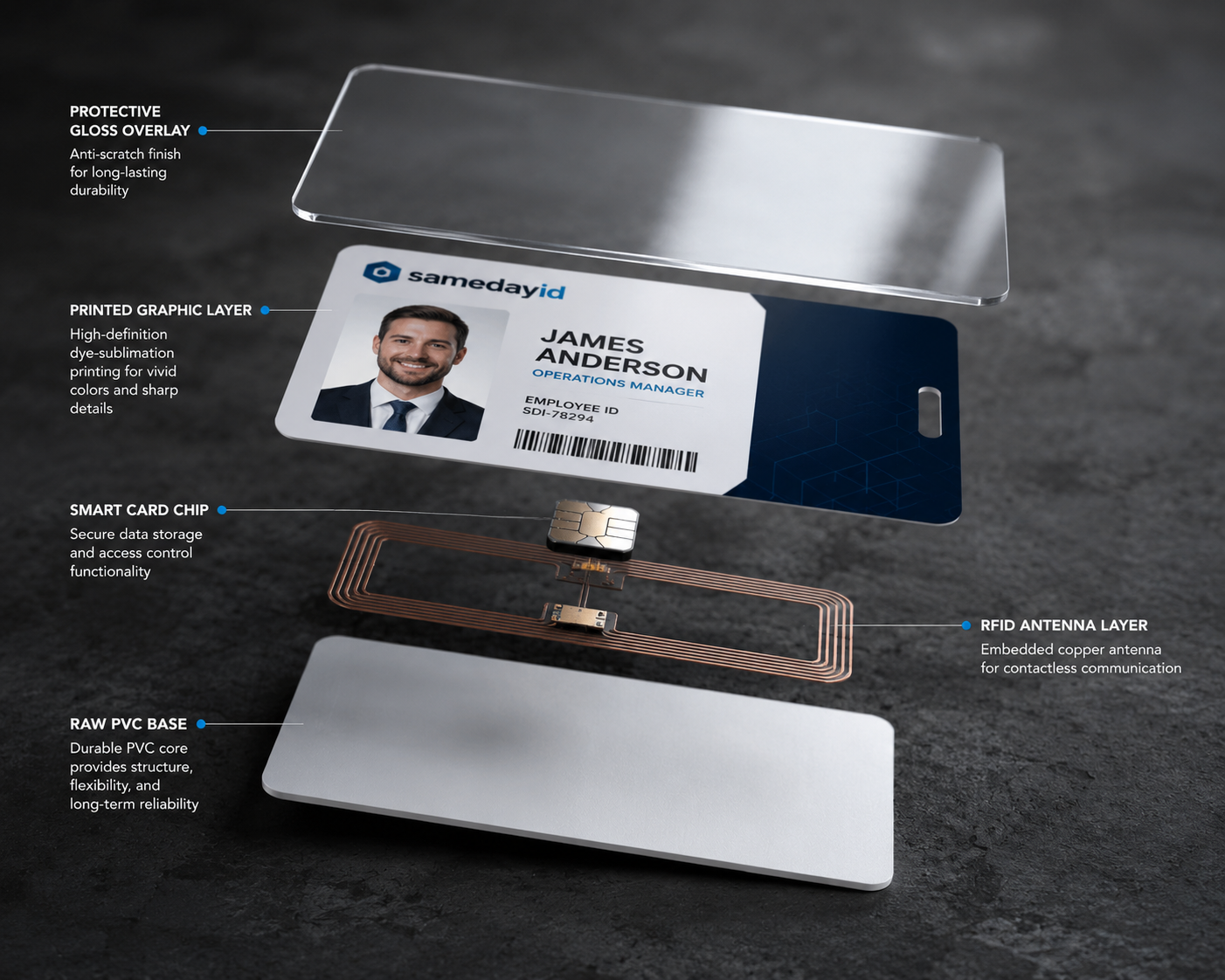
PVC ID cards are made by preparing artwork and data, printing it onto blank CR80 PVC cards with a card printer that uses heat to transfer dye from a ribbon, then adding any overlay, finishing and a final quality check. The process takes minutes per card once the design is approved.
Need cards soon? Start your design on the order page. Orders placed before the 1 PM ET cutoff go into same-day production. Shipping time depends on the method you choose at checkout.
We review every order before it prints.
Last updated: November 5, 2026
Step 1: The blank card
Most ID cards start as blank polyvinyl chloride cards in the CR80 size, the same 3.375 x 2.125 inch format as a credit card. The standard thickness is 30 mil, which feels sturdy without being stiff. Blanks are made by laminating layers of PVC under heat and pressure, which gives them a smooth, glossy surface that takes dye well. Some cards use a composite blend of PVC and polyester for extra heat resistance, and some have a magnetic stripe or chip built in before printing.
Step 2: Artwork and data prep
A card design has two parts: the template, which is the same on every card (logo, colors, layout), and the variable data, which changes per person (photo, name, title, card number). Photos are cropped to a consistent head size and background, and images and text are prepared at a print resolution of around 300 DPI so they stay sharp. Names are merged from a spreadsheet so each card pulls the right record.
Step 3: The proof (optional)
If you add a digital proof to your order, it shows exactly how the design and data will appear. Before anything is printed, this is the step that catches typos, cropped photos and logos that are too small. At Same Day ID, we review every order before it prints.
Step 4: Printing
Card printers use a thermal print head and a ribbon with separate panels for yellow, magenta, cyan and black, plus an overlay panel. The print head heats tiny points on the ribbon so dye transfers into the card surface. This is called dye sublimation, and it produces smooth, continuous-tone photos. Retransfer printers do the same thing onto a clear film first and then bond the film to the card, which allows edge-to-edge color. Black text and barcodes are often printed with a resin panel for crisp edges.
Step 5: Overlay and finishing
After the color passes, a clear overlay panel is applied to help protect the print from everyday scuffs. Some programs add a thicker laminate for cards that see heavy use. If the card is double-sided, it is flipped and printed on the back. Slot punching for clips or lanyards can be done before or after printing.
Step 6: Encoding, when needed
Cards with a magnetic stripe or chip can be encoded with data as a separate step. That data has to match the format the reader expects, so this step depends on the card program rather than the printer alone.
Common print defects and what causes them
Most card defects trace back to a few causes. White specks usually mean dust on the card or rollers, which is why blanks are handled by the edges and printers are cleaned on a schedule. Faint or streaky color often points to a worn print head or a ribbon that sat too long. Blurry photos come from low-resolution source images rather than the printer itself. Text that runs off the edge means a long name was not tested against the template. A careful proof and a quick look at the first few cards catch nearly all of these before a full batch is printed, which is why that check is built into every order we run.
Direct-to-card vs. retransfer, in brief
- Direct-to-card. Process: dye goes straight into the card surface. Edge: thin white border. Best on: flat standard PVC. Speed: fast.
- Retransfer. Process: image printed on film, then bonded to the card. Edge: full bleed to the edge. Best on: cards with chips or slightly uneven surfaces. Speed: a bit slower per card.
Both methods produce sharp photos. The choice usually depends on whether your design needs edge-to-edge color and what kind of card stock you use.
How to prepare your files for a smooth print
Send your logo as a vector file (SVG, EPS or PDF) or a large PNG. Use photos at least 600 pixels wide, cropped from the shoulders up against a plain background. Keep your spreadsheet to one row per card, with consistent capitalization and a column that names each photo file. Mark which fields go on the front and which on the back. Test the template with your longest name and title. Files prepared this way usually go from proof to printer without a second round.
Glossary of card printing terms
- CR80: the standard ID card size, 3.375 x 2.125 inches.
- Mil: a thousandth of an inch, used for card thickness; 30 mil is standard.
- YMCKO: a ribbon with yellow, magenta, cyan, black and overlay panels.
- Dye sublimation: heating dye so it transfers into the card surface.
- Resin black: a black panel used for crisp text and barcodes.
- Overlay: a clear protective layer applied after printing.
- Retransfer: printing onto film and then bonding it to the card.
- Slot punch: a hole cut for a clip or lanyard.
Step 7: Quality check and packing
Every card is checked for color, alignment, spelling against the data file and any print defects such as streaks or dust spots. Cards are then sorted in the order you provided and packed so they arrive clean. Orders placed before the 1 PM ET cutoff go into same-day production.
Related reading
- Start your card design
- PVC vs. composite ID cards
- PVC card printer buying guide
- how to care for PVC cards
Frequently asked questions
What material are ID cards made from?
Most are polyvinyl chloride (PVC). Composite cards blend PVC with polyester for more heat resistance.
What size is a standard ID card?
CR80, which is 3.375 x 2.125 inches, usually 30 mil thick.
How is a photo printed on a PVC card?
A thermal print head transfers dye from a ribbon into the card surface, a process called dye sublimation.
Why do cards get an overlay?
A clear overlay helps protect the printed surface from everyday wear.
How long does it take to print one PVC card?
Printing itself takes well under a minute per card. Design, proofing and quality checks take most of the time.
Can I print on both sides of a PVC card?
Yes. Dual-sided cards are printed on one side, flipped and printed on the back.
Ready to get started?
When your design and names are ready, start your order. Orders placed before the 1 PM ET cutoff go into same-day production, and shipping time depends on the method you choose at checkout. Start your order now
Also see our sister brand WorkIDCard for multi-site employee badge programs.
We review every order before it prints.